
Adding coroutines to my c++ game engine
Coroutines in Unity
I first got acquainted with the concept of coroutines back when I started using Unity (I believe I started with version 3.5).
Coroutines are incredibly powerful, but you need to be aware they exist and know how to use them. For example students often write things like this in a MonoBehaviour to perform a camera shake:
public class CameraShake : MonoBehaviour
{
    private Vector3 originPos;
    private float duration, elapsed, intensity;

    public void TriggerShake(float intensity, float duration) {
        originPos = transform.localPosition;
        this.intensity = intensity;
        this.duration = duration;
        this.elapsed = 0f;
    }

    private void Update() {
        if (elapsed >= duration) return;

        elapsed += Time.deltaTime;
        float decay = 1f - Mathf.Clamp01(elapsed / duration);
        transform.localPosition = originPos + (Vector3)Random.insideUnitCircle * (intensity * decay);
        if (elapsed >= duration) transform.localPosition = originPos;
    }
}
This is a common pattern I see students use: something needs to happen for a while, thus an elapsed and duration time value is compared every frame in the Update and if the time is right, the thing is happening.
This is not a good approach; we’re performing that comparison every frame (we are on the hot code path!) and most of the time our camera is not shaking, so more often than not, this comparison will return false and the Update was called for nought. Better to use a coroutine:
public class CameraShake : MonoBehaviour
{
    public void TriggerShake(float intensity, float duration) {
        StartCoroutine(DoShake(intensity, duration));
    }

    private IEnumerator DoShake(float intensity, float duration) {
        Vector3 originPos = transform.localPosition;
        for (float elapsed = 0; elapsed < duration; elapsed += Time.deltaTime)
        {
            float decay = 1f - (elapsed / duration);
            transform.localPosition = originPos + (Vector3)Random.insideUnitCircle * (intensity * decay);
            yield return null; // This waits until the next frame
        }
        transform.localPosition = originPos;
    }
}
Notice how we no longer need any member variables to achieve the exact same behaviour and we are no longer comparing float values on the hot code path! The for loop will run like any other, but at the yield instruction, the function is “paused” and it will continue from that point in the next frame.
It is the next frame because we used yield return null;, we could also
- use
yield return new WaitForSeconds(10);- then the function would continue after 10 seconds - use
yield return AsyncOperation;- then the function would continue when a certain asynchronous operation is done, like for exampleSceneManager.LoadSceneAsync - use
yield return new WaitForEndOfFrame();- then the function would continue after all the rendering is done for the current frame - use a bunch of others here.
As you can see, this simplifies code incredibly. As soon as students learn this concept, a whole new world opens up, code becomes cleaner and easier to maintain and often is a lot more performant.
In Unity, coroutines can be started and stopped on monobehaviours.
StartCoroutinestarts a specific coroutine on the MonoBehaviourStopCoroutinestops a specific coroutine on the MonoBehaviourStopAllCoroutinesstops all coroutines on the MonoBehaviour
Coroutines share their lifecycle with the MonoBehaviour they belong to. This means that when a GameObject is deactivated or a specific MonoBehaviour is disabled, the coroutines currently running on that MonoBehaviour will no longer be resumed. They will be removed, so you’ll need to restart them when you deactivate/activate a game object.
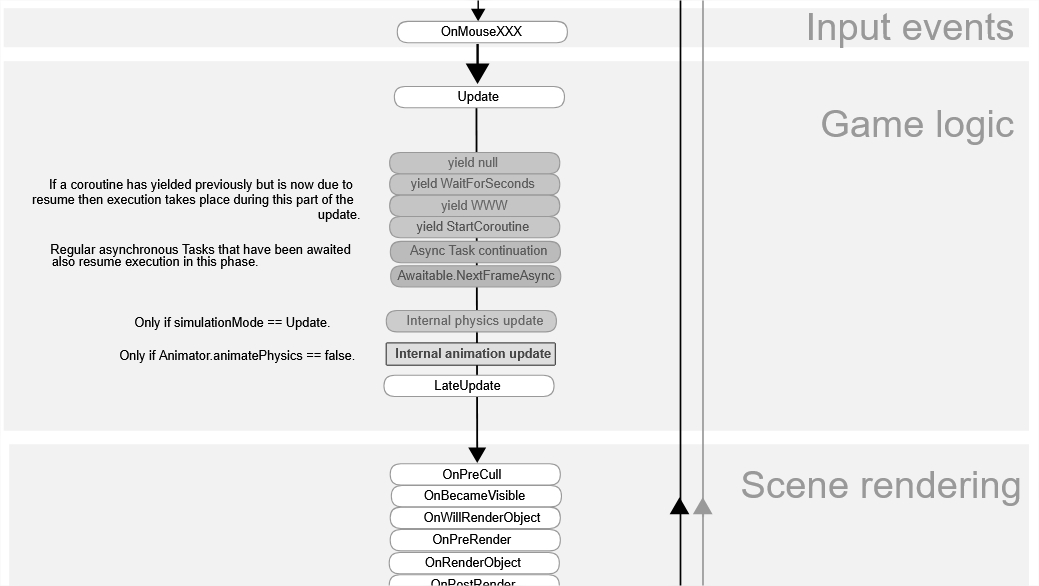
During the game loop, the MonoBehaviour will check the various active coroutines and their corresponding yield instructions (WaitForSeconds, WaitForEndOfFrame, etc) and resume the ones that need to be resumed. This is nicely illustrated on this page here.
Coroutines in C++
At Howest - DAE I teach a course called “Programming 4” where we develop a small 2D game engine in C++. The course intends to give the students insight into game (engine) programming patterns. We base ourselves off the book Game Programming Patterns by Robert Nystrom. Obviously we discuss the patterns Game Loop, Update Method and Component which form the basis for the inner workings of an engine. It is literally the content of the first class.
With those patterns applied in their engines, the students have everything in place to implement our first example, including the comparisons on the hot code path and the extra member variables. Robert mentions these downsides as well. Coroutines fix these for us.
Recently I watched the talk “Inside C++ Coroutines” by Lieven De Cock. This was an online event by Packt and the replay is still available. It is this talk that inspired me to delve a bit deeper and try to add the same functionality we have in Unity to our C++ engine.
Interestingly, Lieven starts his presentation with these two slides:
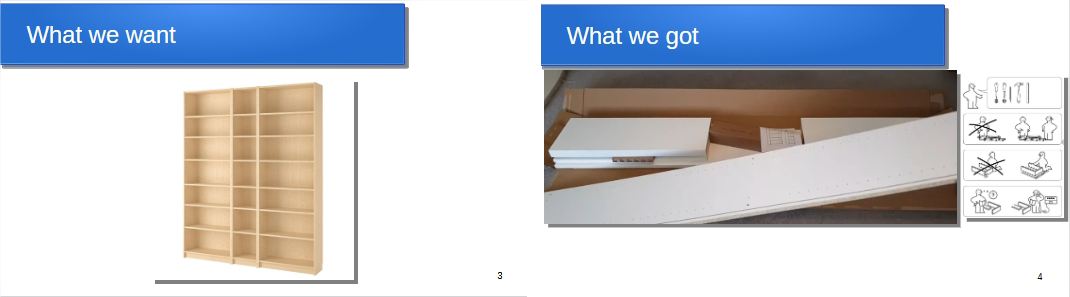
Coroutines were introduced in C++20. All in all, I have seen a lukewarm reception of that addition, but that might be caused by the fact that it takes quite some boilerplate code to use them, which is exactly what Lieven alludes to with his Billy closet.
There’s lots of details and work to be done when using coroutines and Lieven goes deep into those details in his talk, so I won’t be repeating all of it here. I am interested in seeing if we can integrate coroutines in our student’s engines too, so they can start using that simple Unity approach to steer game behaviour in a similar manner. I’ll be focussing only on what we need to that end.
Phil Nash has a talk at ACCU 2025 titled C++ Coroutines Demystified which I can recommend to watch, much of what he demonstrates there while live coding is similar to what we will be writing here.
Implementation
Cppreference.com obviously has a page on coroutines but it possibly might be the worst page on that website, giving many examples in a scattered way without any clear overview.
There’s a bunch of existing libraries that implement some scaffolding, like for example cpproutine by Argie-Daios or cppcoro by Lewis Baker and there is boost.cobalt. However, in my case I’d like to minimize external code dependencies as much as I can. After all, this is for a course where we implement the engine ourselves, if not we could just use Unreal instead. (That’s not true, Unreal doesn’t have coroutines)
CoroutineRunner
In this whole concept, something is capable of starting and stopping coroutines and resumes them when certain yield instructions are reached during the game loop. In Unity that’s the MonoBehaviour. In our student’s engines these are often called “BaseComponent”, “Component” or something similar; the base class for components. We could implement the coroutine code in that Component class or move it into a specific “CoroutineRunner” class which the Component uses. I chose the latter and forward the function calls to the runner.
void dae::Component::UpdateCoroutines()
{
    m_coroutineRunner.Update(GameTime::GetDeltaTime());
}

dae::CoroutineId dae::Component::StartCoroutine(Task task)
{
    return m_coroutineRunner.StartCoroutine(std::move(task));
}

bool dae::Component::StopCoroutine(CoroutineId handle)
{
    return m_coroutineRunner.StopCoroutine(handle);
}

void dae::Component::StopAllCoroutines()
{
    m_coroutineRunner.StopAllCoroutines();
}
UpdateCoroutines gets called by the GameObject during the update loop. We also need to make sure coroutines stop when we are disabled
void dae::Component::SetEnabled(bool enabled)
{
    if (m_enabled == enabled)
        return;
    m_enabled = enabled;
    if (enabled)
        OnEnable();
    else {
        StopAllCoroutines();
        OnDisable();
    }
}
Of course, maybe not all components need a runner so you could move this code into a more specific component class. Unity does the same, coroutines are managed by MonoBehaviour which inherits from Behaviour which inherits from Component.
Boilerplate
Let’s get started with writing the boilerplate code we need.
CoroutineId
In the previous code we use CoroutineId as a handle to identify our coroutines with, which is simply a wrapper for a uint:
struct CoroutineId
{
    uint64_t id {0};
    bool operator==(const CoroutineId& other) const { return id == other.id; }
    bool operator!=(const CoroutineId& other) const { return id != other.id; }
    explicit operator bool() const { return id != 0; }
};
Task
Then there’s that Task.
#include <coroutine>

struct Task {
    struct promise_type {
        // ... bunch of code ...
    };

    std::coroutine_handle<promise_type> handle;

    Task(std::coroutine_handle<promise_type> h) : handle(h) {}
    Task(Task&& other) noexcept : handle(std::exchange(other.handle, nullptr)) {}
    Task& operator=(Task&& other) noexcept {
        if (this != &other) {
            if (handle) handle.destroy();
            handle = std::exchange(other.handle, nullptr);
        }
        return *this;
    }
    Task(const Task&) = delete;
    Task& operator=(const Task&) = delete;
    ~Task()
    {
        if (handle) { handle.destroy(); handle = nullptr; }
    }
};
Let’s ignore promise_type for a while and you see that Task itself is nothing more than a RAII wrapper for std::coroutine_handle<promise_type> handle;. This handle contains the execution state (local variables, current line of code, etc) of the coroutine and an object of type promise_type. With the handle you can
resume()the coroutine- check whether it’s
done() destroy()the coroutine- get the
promise()from the handle
Our Task is what IEnumerator is in the Unity coroutine system.
promise_type
They chose the worst possible name for this type, because it is completely unrelated to std::promise. It is a struct/class that needs a specific set of functions, expected by the compiler.
In our specific case the promise_type needs to store what the current yield instruction is, so let’s define those first:
struct WaitForSeconds { float seconds; };
struct WaitUntil { std::function<bool()> predicate; };
using YieldInstruction = std::variant<std::nullptr_t, WaitForSeconds, WaitUntil>;
With these three types we can yield to the next frame, yield for a few seconds and yield until a certain predicate returns true.
With those types in place we can now write our promise_type
struct promise_type {
    Task get_return_object() {
        return Task{ std::coroutine_handle<promise_type>::from_promise(*this) };
    }
    std::suspend_never initial_suspend() noexcept { return {}; }
    std::suspend_always final_suspend() noexcept { return {}; }
    void unhandled_exception() { std::terminate(); }
    void return_void() {}

    std::suspend_always yield_value(std::nullptr_t) noexcept {
        current_yield = nullptr;
        return {};
    }
    std::suspend_always yield_value(WaitForSeconds wfs) noexcept {
        current_yield = wfs;
        return {};
    }
    std::suspend_always yield_value(WaitUntil wu) noexcept {
        current_yield = std::move(wu);
        return {};
    }

    YieldInstruction current_yield = nullptr;
};
- The compiler will allocate the coroutine frame on the heap, construct the
promise_typein that frame and callget_return_object()on it to get the return value (the Task) where StartCoroutine was called. initial_suspend()returns whether the coroutine starts suspended or not. In our case we want our behaviour to match with the Unity coroutines, so no, we should not start suspended; the coroutine runs immediately until its firstco_yieldorco_returnfinal_suspend()returns whether the coroutine needs to be freed after it has run, or remain in memory. Since we are managing this ourselves with the Task RAII wrapper, it should indeed be suspended (it is done though).unhandled_exception()is called when an exception is thrown from the coroutine, you can choose how to handle that here. In our simple example we just let the program terminate.return_void()is there to indicate there is no final value being returned (otherwise we should have definedreturn_value()). Interestingly, we could invoke a “OnComplete” callback here if we would add that in thepromise_type.- The three
yield_value()functions are overrides for each type of YieldInstruction, we store the instruction for later use and return that the coroutine should be suspended.
ActiveCoroutine
With all that boilerplate in place we can now write the actual CoroutineRunner (the one used by Component). We need to maintain a list of coroutines that are currently active. Let’s define a container for those, containing additional data (the timer value) as needed:
struct ActiveCoroutine {
    uint64_t id;
    Task task;
    float timer = 0.0f;

    ActiveCoroutine(uint64_t id, Task t, float time)
        : id(id), task(std::move(t)), timer(time) {}

    ActiveCoroutine(ActiveCoroutine&&) noexcept = default;
    ActiveCoroutine& operator=(ActiveCoroutine&&) noexcept = default;

    ActiveCoroutine(const ActiveCoroutine&) = delete;
    ActiveCoroutine& operator=(const ActiveCoroutine&) = delete;
};
We keep a vector of those and add coroutines like this:
dae::CoroutineId StartCoroutine(Task task)
{
    static uint64_t nextId {1};
    CoroutineId id = { nextId++ };
    coroutines.emplace_back(id, std::move(task), 0.0f);
    return id;
}
CoroutineRunner::Update()
During the gameloop we call Update() on our runner which will now check which active coroutines are in need of being resumed. The comments in the code below document how it works.
void Update(float deltaTime)
{
    // loop over all active coroutines
    for (size_t i = 0; i < coroutines.size(); )
    {
        auto& active = coroutines[i];

        // if the coroutine is done, remove it from the list
        if (!active.task.handle || active.task.handle.done())
        {
            coroutines[i] = std::move(coroutines.back());
            coroutines.pop_back();
            continue;
        }

        // if the coroutine has a timer value, subtract deltaTime
        if (active.timer > 0.0f)
        {
            active.timer -= deltaTime;
            if (active.timer > 0.0f) {
                ++i;
                continue; // There's still time left thus no need to resume
            }
        }

        // if the coroutine has a predicate, check it
        const auto& instruction = active.task.handle.promise().current_yield;
        if (std::holds_alternative<WaitUntil>(instruction))
        {
            const auto& waitUntil = std::get<WaitUntil>(instruction);
            if (waitUntil.predicate && !waitUntil.predicate())
            {
                ++i;
                continue; // Predicate is false thus no need to resume
            }
        }

        // the coroutine resumes here
        active.task.handle.resume();

        // if it is done now, remove it
        if (active.task.handle.done())
        {
            coroutines[i] = std::move(coroutines.back());
            coroutines.pop_back();
        }
        else
        {
            // it was yielded again, see if we need to set a timer value
            active.timer = 0.0f;
            auto& newInstruction = active.task.handle.promise().current_yield;
            if (std::holds_alternative<WaitForSeconds>(newInstruction))
            {
                active.timer = std::get<WaitForSeconds>(newInstruction).seconds;
            }
            ++i;
        }
    }
}
Using them
Finally, with all that code in place, we can start using them in a game! As an example I have a Pac-Man game and I want the ghosts to flash when they spawn into the level. I toggle the sprite of the ghost on and off with a delay of 0.2 seconds in between. To do that I can now write this simple code in my game:
void Ghost::Flash()
{
    StartCoroutine(DoFlash());
}

Task Ghost::DoFlash()
{
    auto image = GetOwner().GetChildAt(0)->GetComponent<ImageComponent>();
    co_yield WaitForSeconds{ 0.2f };
    for(int i = 0; i < 6; ++i)
    {
        image->SetEnabled(!image->IsEnabled());
        co_yield WaitForSeconds{ 0.2f };
    }
}
I have the habit of writing a public regular function for the users of the class, which starts a private coroutine with the extra prefix “Do”. I could also have used a lambda:
void Ghost::Flash()
{
    auto image = GetOwner().GetChildAt(0)->GetComponent<ImageComponent>();
    StartCoroutine([](ImageComponent* img) -> Task
    {
        co_yield WaitForSeconds{ 0.2f };
        for(int i = 0; i < 6; ++i)
        {
            img->SetEnabled(!img->IsEnabled());
            co_yield WaitForSeconds{ 0.2f };
        }
    }(image));
}
To make the above possible, I defined the concept of a TaskCallable
template <typename F>
concept TaskCallable = requires(F&& f) {
    { std::forward<F>(f)() } -> std::same_as<Task>;
};
To be able to add an overload that accepts lambdas and immediately invokes them
template <TaskCallable Callable>
CoroutineId StartCoroutine(Callable&& callable) {
    return StartCoroutine(callable());
}
Careful though when using these lambda coroutines, don’t use any captured variables as they will be lost when the coroutine is first resumed, which will crash the program. (Temporary lambdas are destroyed at the end of the statement and captured variables will turn into dangling references on the first resume). You can fix this by passing these variables by value to the lambda (which I did in my example above for the image component).
If you wanted to exit a coroutine at some point other than at the end, in Unity we’d write yield break; and in C++ we use co_return;.
More
That’s it, we now have similar functionality as we have in Unity. Unity provides a lot more YieldInstruction types, which we could add if we wanted to, but for now this is all I need in the context of this engine.
Starting these coroutines allocates memory on the heap which is something we’d like to avoid in the context of a game engine, so an extra addition to this system would be a custom memory manager that tackles this issue.
It takes a bit of setup, but once it’s in the engine, it has become convenient to drive gameplay behaviour with coroutines.
Source
I can’t give you the complete source as it contains a demo solution to all the student’s assignments, but here are the two files that define the CoroutineRunner which covers most of what we discussed here: